Showing posts with label assessment for learning. Show all posts

Sunday, April 14, 2019

Less marking, more feedback


My mind was blown at the end of Term 2 during the Primary ICT Showcase. Seeing the range of talent on show within the Primary School was inspiring and something to be celebrated loudly.


We began the showcase with Demo Slams, the opportunity for ordinary teachers to display their extraordinary tech integration to their peers. Ben Henry, Grade 5, Dover was one of the slam recruits and he showed the crowd his awesome use of QuickTime Player to facilitate giving feedback about a piece of writing.


I’ll let Ben set the scene:


The children had been working on their Historical Fiction stories during Writing Workshop and it was the week before their final edit.  For their homework task, each ‘Writing Buddy’ was asked to read their partner’s story and to identify a couple of areas that they were impressed with, along with a suggestion for the final edit. The children had the option of drawing from my marking comments already in the Google Doc, but it was remarkable how accurate the buddies were at making a relevant suggestion that would improve the writing. The children communicated their suggestions for improvements and the elements they were impressed with using QuickTime player in the form of a screen recording. Since the children enjoyed making the screen recordings, and are equally (if not more) concerned with their partner’s comments as they are with mine, I will certainly be using this method in the future.

Here is an example of a student giving feedback to their writing partner.


Grade 5 'Peer 2 Peer' Feedback from UWC South East Asia on Vimeo.


Sean McHugh (DLC on the Dover Campus) has written about RAT and SAMMS in previous posts on this blog. What Ben demonstrated in his use of video feedback is in the transformative area of RAT; ‘technology as transformation’. Being able to give this level of useful feedback moves both the writer and the student giving feedback forward in their understanding of the concepts. The writer has demonstrated that they are able to listen to the lessons given in class about how to write this particular genre and process them to create a comprehensive piece of writing. The student giving feedback has to understand the genre well in order to give feedback to their partner and move their writing on. By allowing the chance for peer to peer feedback the skills being demonstrated and developed by both parties are immense.


The beauty of using technology to facilitate this process is listed in the SAMMS framework. The fact that Google docs can be accessed from anywhere with an internet connection (Situational), allows for instant reworking of the piece (Mutability) and provides a space where two students and the teacher can collaborate on one document (Social).


It is also a brilliant example of Dylan Wiliam’s Assessment for Learning strategies.


Wiliam breaks down AfL into 5 key strategies


1. Clarifying learning intentions
2. Eliciting evidence
3. Feedback that moves learning forward
4. Students as learning resources for one another
5. Students as owners of their own learning (ownership - metacognition, motivation, interest, attribution, self-assessment)
(Wiliam & Thompson, 2007)


Ben’s use of feedback thoroughly demonstrated the third and fourth points in Wiliam’s list. The students receive feedback from their teacher and also from a peer to improve their writing. Before I saw this being used I would have guessed that the feedback being given from a writing partner would be a little shaky and inaccurate at best. After seeing this in practice the feedback being given is 90% accurate and very well articulated.


To anyone who would like to do less marking and give more feedback using screen casting come and speak to myself or Ben for more details.


Wednesday, January 10, 2018

The digital photocopier - Google Doc copy and assignments in Teamie

This blog post outlines a powerful tool for both sharing copies of Google Docs with students but also collecting them so you can easily provide feedback and track progress. This is a time saver for both students and teachers and avoids the need to students to copy links and submit files.

Within the Online Learning Platform (Teamie) you can make an assignment which will automatically create a copy of a template Google Doc for each student to work on. The assignment will hold the Google Docs in one place so you can scan through students ahead of your final deadlines.

Creating the assignment

Firstly navigate to materials and then press the + button to add an assignment. You will need to give a brief description of the assignment and then use the Google Drive picker as shown below to add a Google Document.

You can add Google Docs, Google Slides or Google Sheets as files to be copied for students.


What do students see?

Once they navigate to the assignment they can select 'take now' There is then a small lag whilst the document is copied and then permissions shared. Once copied students can either work on the file in Teamie or via their Google Drive. 

Once the deadline is reached the students will need to submit for your to allocate marks or use a rubrics. Student can also submit one of more documents using the regular option to link to upload a file. 


Navigating and tracking progress

Once students have clicked to begin the assignment you can view the drafts from the assignment submissions page as outlines below. You can sort by status and then click as shown to see overviews of individual students work and leave comments. 


Sunday, November 12, 2017

Padlet for Collaboration and Formative Assessment

Padlet is an excellent example of an app which we can repurpose in lots of different ways to support student learning. You can use it in simple ways to quickly crowdsource ideas from a class to more nuanced uses where you want to track growth in student skills and to support feedback.

Below are some examples and some geeky tips to get the most use out of Padlet. As a teacher you can sign up for free on their website and then share the link to any Padlet you might make with students via the Online Learning Platform. Make sure you check the sharing permissions so students can contribute or toggle authentication and commenting if you want to track student participation.


Monday, October 9, 2017

Moving from examples to understanding an abstract concept - Google Slides and the Frayer Model

A approach lots of people are exploring this year is how do we scaffold students towards conceptual understandings and track and assess this growth.  In the work of Lynn Erickson and other theorists, this begins with the idea of concept formation or concept acquisition.

What do we mean by concepts?

As explained by Erickson, concepts are mental constructs that are abstract, timeless and universal. (Erickson & Lanning, 2014, p.33) They can be either broad in their context such as the concepts about change, interdependence or systems which are potentially interdisciplinary in nature or subject specific concepts such as velocity, unemployment or herbivores. These are also distinguished as macro or micro concepts, where micro concepts become evident in the depth of subject knowledge in each discipline.

Teaching to support conceptual acquisition:

One activity I see and utilise frequently is the classic sort, organise and group activity where you provide a wide arrange of examples relating to the concept and get students to identify similarities, differences and connections. In this Economics example, I was scaffolding students towards an understanding that:
products are related and the price change in one product can impact demand of related products. eg. complements and substitutes
In this case students quickly sort examples of products being substitutable or complementary to each other, but they often muddle the nuances of the relationship and the relative strengths of connections between goods that is evident when prices change.


Consolidating understanding: The Frayer Model

A perfect follow on activity is to use a diagram called the Frayer Model to get the students to record their understanding. The Frayer Model is essentially a graphical organiser you can use to capture either prior knowledge about a concept as a pre-assessment, to capture thinking after an activity, or as a tool to revisit and refine as students learn more about the concept through an inquiry.
  • an operational definition; in subject terminology what does the idea mean?
  • characteristics; what are the unique properties of the word that are shared by the examples.
  • examples; in what examples are these properties clearly illustrated?
  • non-examples; in what examples are these properties not illustrated?
The prompt asking students to list non-examples is really important as this is where you can identify some misconceptions. For instance peanut butter and jam (or jelly) might seems to be a complement for some people, but might be substitutes for others and a non-example.

Capturing the thinking: Google Slides

You can of course facilitate this in different ways e.g. pairs, groups on poster paper, but I have found using a Google Slides template as an effective way of scaffolding the students but also being able to track their work. It is a good tool where you can give comments, and where students can go back to as the learning progresses and make changes. It is also useful if you want students to scroll and see other students examples and ideas.

Click here to make a copy of the template


Together the two approaches are an important tool to help students build understanding which can later help them transfer and apply ideas to other situations.

Other related posts to explore:

The following are posts written by colleagues at the East Campus of United World College of South East Asia in Singapore. These cover the same ideas but from different subject angles.
  1. Open Sorting for Concept Formation
  2. Learning Concept words in EAL and transfer strategies
  3. Concept acquisition and misconceptions


Saturday, September 16, 2017

Blended Screencasts - Record & Flip

Record & Flip

Record it, then flip it, simple!

Screen recording, or Screencasts are one of most most effective teaching tools in the arsenal of a teacher who is fortunate to be work in a 'technology enhanced learning environment' but, if the devices you have to hand are laptops, not tablets, than expecting your students to create a screencast can be more of a hassle than it's worth. 

That is unless you know how to record and flip. 

I've used demonstrated this technique before in a context of asking students to model a skill with apparatus, such as how they can measure an angle with a protractor, but with a little imagination it's not difficult to see how this could be used in other ways:
  • Mapping skills in Humanities
  • Rationale for a design proposal in Design & Technology
  • Description of the significance of imagery in the Visual Arts
  • Mind Mapping relationships and connections
  • Reflection on ideas and opportunities for development in a flash draft in English
  • Reflection/critique of a passage/excerpt in a printed book/magazine
  • Annotation of musical notation to indicate understanding of the structure
  • Annotation of diagrams, graphs, and charts
  • Explaining a strategy or process in solving a Mathematics problem
  • and many more...
All the students need is a whiteboard or a sheet of paper, and to position it as shown above. They can tap the spacebar to start and stop the recording. 

Once the recording is finished the student can flip the video horizontally and vertically, then review and trim* the video is necessary before sharing it with the teacher. 


An Example from Mathematics

Here's one I did earlier...**


*If the student has done a great deal of  'umming and ahhing' they can delete the segments of the video that are unimportant, but most of the time this is probably unnecessary as you're not looking for a highly polished artefact here, and hesitation (when and why) may well be useful information in and of itself.

Student Example


** Disclaimer, the hesitation you see in this video was intentional in order to create a sense of authenticity, honest, it's true! 

Friday, September 8, 2017

Quizlet Diagrams - revise knowledge with clever visuals

Quizlet remains as one of those Swiss Army knife style apps that you end up repurposing and going back to time and time again. Last year it got a significant revamp with the Quizlet Live game feature and now there is a clever addition called Quizlet Diagrams.


In essence using Quizlet is a perfect approach to get students to revise new terms or develop and broaden their vocabulary. In Economics I want student to use the appropriate terms and words to explain the nuances of complicated concepts and models. For instance we want our students to confidently use the term 'appreciation' rather than trying to just say that a currency has gone 'up' In my experience Quizlet is a pretty good tool to help develop this basic knowledge.
The new diagrams tool goes further adding a really clever visual layer. You can pin a term to a specific part of the diagram and then the students use the match or learn tools to revise which term matches which part.

How do I use?

  • You need to sign up for a free Teacher account with your GApps account
  • Search the diagrams examples for your subject
  • Duplicate an existing set of flashcards or create to start a fresh
  • Drag a screenshot or image into Quizlet
  • Use the pin icon to add terms.

Are there examples I can look at?

There are lots of really clever examples already created and available online. You can share any of these with your students by posting the link into our Online Learning Platform (Teamie)

Have a go and test yourself first !
  1. Biology Cell Structure Diagram
  2. Soil Layers Diagram - Science and Geography
  3. Match the European Country
  4. Spanish Vocab - el desayuno (what's for breakfast I think :)


How do students access?

You can copy the link directly from Quizlet and send this to your students with the Online Learning Platform (Teamie) The two best modes from students to practice diagrams are Learn Mode or Match Mode.

Learn mode is very clever and randomly gives students either match or multiple choice questions based on the set of flashcards you have created and it helps students track which ones they find easy and those which are harder. Match mode is probably the best supported to diagram and give the students a random challenge based on the flash cards you have added to a diagram. See below


via GIPHY

Wednesday, June 7, 2017

Digital Approaches to Activating Prior Knowledge


In our staff meeting we explored ways that technology can really enhance our ability to activate and assess prior knowledge and to introduce concepts. We all have approaches to pre-assess students understanding some of which involve technology.

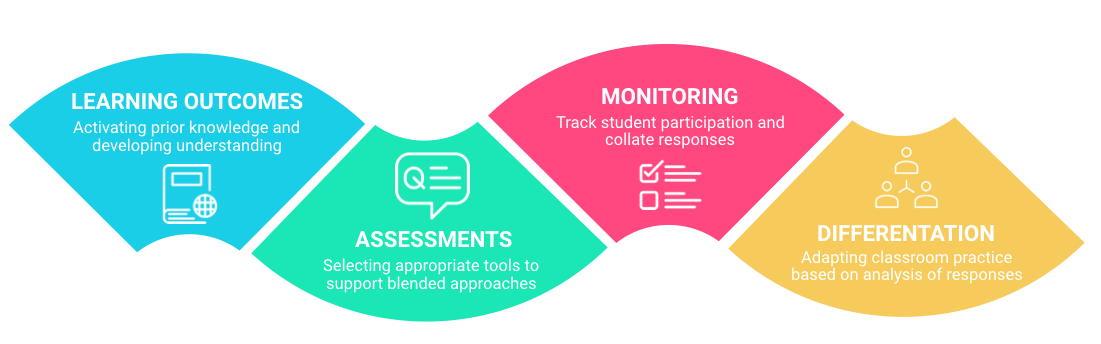
There are specific digital tools when used a part of our repertoire can amplify the process of activating knowledge. In clever ways they help assessment, monitor, track and provide the data to help us differentiate learning in the face-to-face classroom. Overtime we should be comfortable with the following and use them to help assess and support differentiation.
If you teach Maths there is an amazing range of specific adaptive tools at your fingertips. (MangaHigh, Khan Academy, My iMaths) 

First steps:

We all provide students with materials to look over before class, such as unit pages in Teamie, chapters of a textbook or to watch a YouTube video. We also use formative assessment tricks at beginning of lessons such as questioning, mini-whiteboards to connect back to prior knowledge.

Isnt this enough?

Well, yes but with a few tweaks if can be significantly amplified. If we want students to be watch a video or to read an article we should be setting them some questions to focus their thinking.

Technology can really help with this process by letting you
  • Track and monitor if students have actually watched or read the material
  • Automate collecting responses from the students
  • Help you see a collated view of responses and flip between questions or students.

Challenges and thoughts:

Timing:

A few table groups spoke about the timeliness of pre-assessments. If you really wish to differentiate you need adequate time to analyse how students have performed.  For instance if you are beginning to explore a new concept, students can engage with a homework task in the days prior but does this give you time to modify what you were planning to do?

Participation:

Suppose instead of having a mini-lesson during class time explaining a concept, that you record yourself with a document camera and have students engage with this ahead of class. What if only half of the students look at the resource? Do you repeat yourself or split the class into groups. Overtime I would suggest that students understand why you are exploring this approach and help them see it as part of the routine and to be prepared. We also need to do something in the first part of the class that explicitly refers back to the homework and references the prior knowledge so they understand how it connects to the learning. If they come to class prepared and yet that work is not referenced by the teacher they will be less willing to do the pre-assessment next time.

Time: 

To be organised in advance and to preset some homework preparation requires some effort. If you also want to create your own material to support the course it can be extremely time consuming.
  • Start with using a Teamie post to ask a simple question about a resource. This can be a virtual plenary to your lesson. Lock the comment if you don’t want students to see each others comments and then unlock when class begins and get them to read or reply to each others responses.
  • Take an existing good resource or video and repurpose using EdPuzzle.
  • If the approach works explore making your own resource. Try a screencast on your mac using Quicktime, or borrow a document camera to record a mini-lesson.

Presentations - click to end to see department ideas

Saturday, May 21, 2016

Not another Test/Rubric...?


http://www.hippoquotes.com/assessing-quotes


Assessment drives everything educational. So, not surprisingly, assessment is the biggest factor in terms of planning the use of tech in effective ways. This means that it's critical to ensure that we use a varied range of assessment strategies, which is where I find a surprising lack of options.

Why do so many teachers assume that only rubrics and tests are suitable for assessment? Sure they have their place but only within a suite of assessment strategies...

I don't mean to denigrate any particular assessment tool—clearly rubrics and tests can be effective assessment tools, but when they dominate, they have an unfortunate tendency to diminish the importance and efficacy of all of the other tools that are available. It is depressingly common to me that in virtually any educational context (classroom, conference, online) when the conversation inevitably turns to assessment, the question seems to default to, 'what rubric or test will we use?' rather than any awareness that there are a plethora of other tools and strategies that could be just as effective if not more so.

Do less, but do it better.

Now of course it's highly possible that teachers are unaware of the wider range of assessment tools they use effectively almost everyday, such as the ad hoc/informal conversations (conferences in the jargon) with students every day, to spirited class debates (not lectures) that utlise skilful Socratic strategies, which are in and of themselves valid assessment tools. The problem is that I think these are seen as somehow inferior to a "proper" test/rubric. All this does is create a lose/lose scenario for the teacher and the student.  Rather than focusing on tests and rubrics, wouldn't it be better for everyone if we were to embrace a much wider tool kit when it comes to assessment? To see them all as valid/powerful, maybe that conversation/conference was so effective that adding a rubric or a test is not only unnecessary but possibly even counter productive?

I think if you had asked most teachers why it is that they rely so strongly upon rubrics and tests as opposed to all of the other powerful forms of assessment, I think you would find that they would point to one sad fact; they feel they need paper with marks on, that they can attach a grade to, so they  can point to it as being hard evidence of their assessment judgement. While there is clearly a place for this kind of formal (usually summative) judgement, in my experience it is far too frequent and far too common. Teachers could do themselves a favour and do their students a favour by focusing on the goal of learning rather than the need to have a hard artefact to present evidence of every stage of progress.

What if instead we were to focus on the goal, that is, as long as the assessment tools you use allow you to provide effective individual feedback to the student and enables them to progress in their learning point where they are improving compare to their previous level of competence (ipsative assessment), then the goal has been achieved! So why not work a little smarter and use a range of assessment tools that are a far more varied. In so doing you create a classroom environment that is more dynamic, and far more effective for both the teacher and the student.

So what does this have to do with tech?

From my perspective, a classroom that exploits a wide range of assessment tools is a much richer environment within which to be able to integrate digital tools that can truly enhance and transform the way teachers teach and the way the students learn, and demonstrate the extent to which they have mastered the skills, knowledge and understanding that is truly the point, not just in ways that can be measured quantitatively on another test or a rubric. You don't have to look much further than an early childhood classroom to see this in action. Why? One thing their students can't do is demonstrate their understanding via tests or rubrics!

I've always found this matrix from the PYP to be particularly useful to illustrate this, although you may be surprised by the omission of tests from this grid, I believe they (somewhat disparagingly?) categorise these as 'check lists':

From Making the PYP Happen (IBO)

From the 'old days'—not new, but not common either.

If you really insist on using rubrics, a nice way to use them is for the teacher to define a central standard (eg a level 3 on a 5 point scale) and then ask the students to define and justify the level they feel their work sits in comparison to that, with examples.


More reading on the problems with rubrics, if you're so inclined:


Tuesday, March 15, 2016

Making the most of Kahoot online quizzes


Kahoot is a ridiculously popular online quiz tool with students that you have probably heard about. Here is a couple of quick hints to maximise its potential benefits, and some alternatives to explore as well. See our full guide on the Tech Hub here

What is Kahoot? 

It is a games based quiz tool which is similar but different to Socrative where students get points when they get an answer correct and additional bonus points based on their speed in responding. As a teacher you see a bar-chart visual once students have completed each question to help unpack misconceptions during the quiz with students. 


Quick Hints:

Use the public banks of quizzes: There is a vast and growing public gallery of Kahoot quizzes, which you can duplicate and adapt and share with your students and colleagues. The tool is currently free, but students need to be in your classroom to participate and access the code.


Download summary of student responses and scores: A slightly hidden feature is the ability to download the full lists of responses as a spreadsheet once students have completed the activity. This provides you with a full breakdown by question and by student and even tells you how long it took the student to answer a question. More information than you will ever need to help guide and inform your classroom practice. 


Alternatives quiz / revision tools

A spoke to a student how had used Kahoot 3 times in one day, so as always variety is important.
  • Socrative - similar online quizzes, either teacher or self paced but without the competitive scoring. Easy to share between colleagues with the code and to download full summary or results as PDF.
  • Quizlet - online flashcards and games for revision. Similar competitive scoring in Scatter Mode, and excellent for terminology revision.
  • Zaption presenter mode; where the video plays on the teacher screen and students answer preset questions on their laptops.
  • Quizzes in Teamie - provides greater range of questions types and connected to units and your classes.
  • Polls in your Teamie class - quick tool for checking for misconceptions or developing hinge questions.

Tuesday, March 10, 2015

Angles, iSight Screencasts & Misconceptions

Before/After Videos for Learning


So you want to make a screencast, but you don't have an iPad?

No problem.

Here's what I call an iSight 'Screencast', yes it's not capturing a screen, and yes it's really just a form of video capture, but you get the idea.

In fact for the lesson I used, this is actually a better way to capture what kids can do than using a screencast, yes, I said it.

Before & After #1


The context for this activity was a Grade 4 maths lesson on using a protractor, I wanted to capture their technique, but I can't possibly watch all of the kids in real time at the same time, but a video cam can. Did I watch all 22 videos? No. Did I need to? No. Did the kids think I might? Yes. Did that spur them to do the best they could as if I or their parents would be watching, well, yes, I think it did (and their parents probably will).

Here's the simple setup:

1 Macbook (with built in webcam), 1 piece of paper, that's it.


Here's the lesson in 7 succinct snippets:

  1. Draw an acute angle on the board
  2. Show kids a protractor, tell them it's for measuring angles
  3. Tell them to make a short video* that shows how they think it works
  4. Watch them as they try this - look for at least one kids that can...
  5. Ask kids to upload their video to a shared space as soon as they're finished**
  6. Now show the class a good example from their peers.
  7. Now they go and try again, see of they can do better, or better still impress me! (not doing, the video shows what they were doing)

*They could use Photo Booth, but I advise using QuickTime, which easily allows the kids to flip the video once they've finished the recording, otherwise their work will appear upside down.

Before & After #2


Here's the student video I used to teach the kids this skill:


Protractor Student Demonstration from UWC South East Asia on Vimeo.


I love the fact that the angles they were measuring were actually harder than the conveniently rounded angle they saw demonstrated.

Finally, share their before/after videos on their Learning Journals, with a short reflection on their learning.

  • Misconceptions captured? Yes
  • Misconceptions addressed? Yes
  • Evidence of learning? Yes
  • Differentiation? Yes, the few kids who could do it the first time perfectly, went on to show how they could measure reflex/obtuse angles, etc.


A nice bonus is that as I have all of their before/after videos accessible online, I can review any of them at any time if I have any desire to check on a particular student's grasp of the skill.

Here's the student video I used to demo a correct method - perfect? No, so I used his few hiccups as a teaching opportunity, so you can be sure his second one was :)


**We use Google Drive


Tuesday, January 13, 2015

Learning Journals

Connecting Pedagogy with Digital Technology


At UWCSEA Dover Campus we are in our second year of adopting a TEL (Technology Enhanced Learning) model based on the exclusive use of tablets, specifically iPads as the primary form of digital technology use in our early years grades. These mobile, multi touch screens have profoundly changed the way our youngest children interact with images, sounds, and ideas (Buckleitner, 2011). We are building a team of digitally literate educators who are grounded in child development theory and developmentally appropriate practices, and who are now becoming more and more proficient in their selection and use of digital tools and interactive media. Media that suit the ages and developmental levels of the children in their care, and, most importantly, that know when and how to integrate technology into the planned and taught curriculum effectively.

As the transformative impact of these technologies began to make themselves felt within the classrooms through the Infant School, it became more and more apparent that these technologies are uniquely suited to reshape the way they as educators share the work they do with their children’s families. The ease with which these mobile devices enable children to save, document, revisit, and share their real-life experiences through images, stories, and sounds, meant embracing a screen based medium as opposed to traditional paper portfolios. The screen allows us to capture these young learners in the modes that are most natural to them, their talk, their activity, alive with interactivity and multimodality, a far cry from the static nature of traditional paper portfolios that are virtually synonymous with early years education. When we made the shift to a digital format we changed the name, as the term 'Portfolio' implied product over process, best work over, well, work. What we really want to see is the 'journey' of learning, yes the final 'product', but arguably more importantly, the process of learning that the student/teacher captures.

[Digital] Learning Journals

Traditional portfolios tend to focus on the latest and best, but this creates what might be termed a ‘performance portfolio’, which supports summative assessment well, but tends to obscure the ‘learning journey’ (WiIliam, 2011). For an incremental view of ability, a learning journal is far more useful. When better work is done, it is added to the portfolio rather than replacing earlier work to allow students, teachers and parents to reflect on review the learning journey of the student. By looking back at earlier samples of their work, they can see what has developed, which has two immediate benefits. The first is that by seeing what has improved and thus identifying the trajectory of development, the student is likely to be able to see how further improvement might be possible. The second is that by focusing on improvement, the student and the parents are more likely to see their child’s ability as incremental rather than fixed (Dweck, 2006).

By leveraging the affordances of digital technologies, students can start developing such learning journals at a very young age. The integration of these digital tools allows these learning journals to be situated online helping educators make and strengthen home–school connections. With technology becoming more prevalent as a means of sharing information and communicating with one another, early childhood educators have an opportunity to build stronger relationships with parents and enhance family engagement. Early childhood educators always have had a responsibility to support parents and families by sharing knowledge about child development and learning. Digital tools offer new opportunities for educators to build relationships, maintain ongoing communication, and exchange information and share online resources with parents and families. Likewise, parents and families can use technology to ask questions, seek advice, share information about their child, and feel more engaged in the program and their child's experiences there (NAEYC, 2012).

Digital devices are now commonplace in homes and offer new and affordable ways for busy family members to communicate, connect to the Internet, and access information and social media tools to stay in touch with their families and their child's teachers and caregivers. These digital learning journals can support the ways educators measure and record development, document growth, plan activities, and share information with parents, families, and communities. The unique affordances of digital learning journals means they not only include photographs but audio and video recordings as well, to document, archive, and share a child's accomplishments and developmental progression with families in face-to-face conferences or through social media. Sending regular updates through social media or email helps families feel more connected to their children and their activities away from home. Most educators understand the value of writing down or recording notes that a child may want to give to parents. Using email, or other communication tools demonstrates the same concept about communication and helps to build digital literacy skills at the same time.

Digital Learning Journals model effective use of technology and interactive media for parent communication and family engagement and also creates opportunities to help parents themselves become better informed, empowering them to make responsible choices about technology use and screen time at home. This engages them as in a partnership with their child’s teachers, meaning that parents can extend classroom learning activities into the home, and encourages co-viewing, co-participation, and joint media engagement between parents and their children (Stevens & Penuel 2010; Takeuchi 2011).

For more details, with examples and a breakdown of our set up please visit this post at http://bit.ly/uwckindy


References

Buckleitner W (2011). “Setting Up a Multi-Touch Preschool.” Children’s Technology Review 19 (3): 5–9. www.childrenssoftware.com/pdf/g3.pdf

Dweck C (2006). Mindset: The new psychology of success. Random House LLC.

NAEYC Statement (2012). A joint position statement of the National Association for the Education of Young Children and the Fred Rogers Center for Early Learning and Children's Media at Saint Vincent College. http://www.naeyc.org/files/naeyc/file/positions/PS_technology_WEB2.pdf

Wiliam D (2011). Embedded formative assessment.

Friday, June 13, 2014

Don't Just Stand There, Reflect on Something!


"Don't just do something, stand there!" 


That could just as easily have been the title of this post, except I wanted to get the critical word 'REFLECT' in there somewhere. The point is, in the midst of the frenetic pace that is our typical school today, it is rare occasion that anyone actually makes time to stop. Stop and think.

Reflection has to be one the hardest things to encourage students to do well, and yet, if we are serious about our students retaining what they learn, cultivating the self awareness that is at the heart of the UWCSEA Profile it's something we not only cannot afford to ignore, but something we need to make a regular, essential element of our classroom practice.


A common objection when this subject comes up is something along the lines of,

'I would if I could, if I had time' 


But as the research highlighted in this post highlights, the fact is, if you want the time you invest in teaching your students to really matter, if your students are going to have any hope of retaining, long term,  what they learn in your classroom, then

... you can't afford to ignore making time for your students to reflect on their learning


Why? Because they only learn by thinking about what they have learned.

The conversation about what kids need to know and to be able to do by the end of high school has gradually shifted over the past several years to emphasize not just rigorous content goals, but also less tangible skills, such as creative thinking, problem-solving and collaboration. That shift has brought schools that are practicing “deeper learning” into focus.


The William and Flora Hewlett Foundation has been a big supporter of this work, defining deeper learning as a model that focuses on critical thinking, communication, collaboration, academic mindsets and learning how to learn, all through rigorous content. New research conducted by the American Institutes for Research (AIR) has found that the deeper learning model does have positive learning outcomes for students, regardless of their background.


“One of the things that we saw in these schools was that the teachers and students themselves were constantly engaged in thinking about what students were learning, and the students were reflecting on their learning and trying to improve it.”


Learning by thinking

Learning by Thinking: How Reflection Aids Performance: a team of researchers from HEC Paris, Harvard Business School, and the University of North Carolina describe what they call the first empirical test of the effect of reflection on learning. By “reflection,” they mean taking time after a lesson to synthesize, abstract, or articulate the important points.

Participants completed a math brain teaser under time pressure and wrote about what strategy they used or might use in the future to solve the problem. This group did 18 percent better in a second-round test than their control-group counterparts, who were not given time to reflect. In the field study, groups of newly-hired customer-service agents undergoing job training were compared. Some were given 15 minutes at the end of each training day to reflect on the main things they had learned and write about at least two lessons. Those given time to think and reflect scored 23 percent better on their end-of-training assessment than those who were not. And these improvements weren't temporary—researchers found they lasted over time.

This study sheds more light on this practice than ever, and what follows is my attempt to sum up their findings as succinctly as I can.

Emphases and content [inside brackets] are mine.

You can access the original paper here.


Research on learning has primarily focused on the role of doing (experience) in fostering progress over time. In this paper, we propose that one of the critical components of learning is reflection, or the intentional attempt to synthesize, abstract, and articulate the key lessons taught by experience. Drawing on dual-process theory, we focus on the reflective dimension of the learning process and propose that learning can be augmented by deliberately focusing on thinking about what one has been doing. [...] We find a performance differential when comparing learning-by-doing alone to learning-by-doing coupled with reflection. Further, we hypothesize and find that the effect of reflection on learning is mediated by greater perceived self-efficacy. Together, our results shed light on the role of reflection as a powerful mechanism behind learning. (Abstract)

...
Individual learning can be augmented when individuals can not only “do” but also “think” about what they have been doing. In doing so, we depart from previous work equating direct learning with only learning-by-doing and introduce the construct of “learning-by-thinking”—i.e., learning that comes from reflection and articulation of the key lessons learned from experience. (p 4)

Reflection— is the intentional attempt to synthesize, abstract, and articulate the key lessons taught by experience. Reflecting on what has been learned makes experience more productive.


Reflection builds one's confidence in the ability to achieve a goal (i.e., self-efficacy), which in turn translates into higher rates of learning. [Or appreciating ones own capacity, efficacy, achievements; eg, I am good at/better at ...] (p 5)


The automatic, unconscious process of learning generated by “doing” becomes more effective if deliberately coupled with the controlled, conscious attempt at learning by “thinking.” In doing so, we extend literature claiming that the capacity to reflect on action is necessary for practitioners to learn (Schön, 1983) [from surface to deep] (p 6)

It's not enough to just think about it, you have to express it, share it.

The process of transforming tacit into codified knowledge requires a cognitive investment that generates a deeper understanding of this knowledge. 


We contribute to this literature by providing empirical evidence of the benefits associated with knowledge codification and uncovering the mechanisms behind them. Our findings suggest that the benefits of codification are not affected whether its purpose is for self-reflection or for sharing know-how with others. [Whether it is a private diary, or whether it is a public journal, like a blog.]

The automatic, unconscious process of learning generated from experience is coupled with the controlled, conscious attempt at learning by reflection. (p 8)


The automatic, unconscious process of learning generated by doing can become more effective if deliberately coupled with controlled, conscious attempts at learning-by-thinking. In particular, we expect individuals to perform significantly better on subsequent tasks when they think about what they learned from the task they completed. (p 9)


Theories of knowledge codification (Cowan, David, and Foray, 2000; Nonaka, 1994; Nonaka and Von Krogh, 2009) shed light on another potential benefit to the knowledge holder of sharing knowledge. Those theories suggest that,

... the reflection effort needed to create the insights to be shared with a counterpart may end up generating a deeper understanding of the problem space itself. 


This deeper understanding benefits the knowledge holder in terms of improved problem-solving capacity. In particular, we would expect the improvement in problem-solving capacity generated by reflection aimed at sharing to be greater than the improvement generated by reflection alone. In other words, one can expect performance to increase the most when reflection and sharing, i.e., thinking and teaching, are coupled. This line of argument should be familiar to those who teach and subscribe to the adage that one learns the most on a subject by being forced to teach it. (p 10)


Though reflection entails the high opportunity cost of one's time, we argue and show that reflecting after completing tasks is no idle pursuit: it can powerfully enhance the learning process.


Learning, we find, can be augmented if one deliberately focuses on thinking about what one has been doing. In addition to showing a significant performance differential when comparing learning-by-doing alone to learning-by-doing coupled with reflection, we also demonstrate that the effect of reflection on learning is mediated by greater self-efficacy. (p 26)
...

Individual learning can be augmented when individuals can not only “do” but also “think” about what they have been doing.


Learning Journals

Our results also have important practical implications. In our field study we showed that taking time away from training [teaching] and reallocating that time to reflection actually improved individual performance. Companies [Schools] often use tools such as learning journals as a way to encourage reflection in training [teaching] and regular operations. Our personal experience is that individuals of all ages may not treat these exercises with much seriousness; however, our findings suggest that they should. Our study highlights that it may be possible to train [teach] and learn “smarter”, not “harder” (p 27)
...

Individual learning is enhanced by deliberately focusing on thinking about what one has been doing. 

Together, our results reveal reflection to be a powerful mechanism behind learning, confirming the words of American philosopher, psychologist, and educational reformer John Dewey:

“We do not learn from experience...we learn from reflecting on experience.” 

Self-aware - Reflection

Practical pointers

So how does this look in our Learning Journals? As we use Google Sites as our learning platform, I've posted examples/models on our Google Site here

Reflection inline on a site page

Reflection as an ongoing journal within folder

In fact any file that is stored within Google Drive allows the ability to comment, and even have a reflective/feedback dialogue with within Drive:


Here's a slideshow of some possibilities to make this simple, and therefore easy to build into regular lessons:


Further Reading

Life can only be understood backwards; but it must be lived forwards.
Søren Kierkegaard
Getting into the Habit of Reflection
Purposeful Reflection
Learning Through Reflection

Or if you prefer, here are my annotated versions:

References

Di Stefano G, Gino F, Pisano GP, & Staats BR (2014). Learning by Thinking: How Reflection Aids Performance. Harvard Business School NOM Unit Working Paper, (14-093), 14-093. Chicago

Murdoch K (2005). Take a Moment: 40 frameworks for reflective thinking. Seastar Education Consulting.

Schön D (1983). The reflective practitioner: How professionals think in action. New York, NY: Basic Books.

Friday, March 14, 2014

Conversation transforms learning in Google Docs and NON Google Docs, in Google Drive


Many educators have now discovered the phenomenal potential of Google Doc commenting to transform learning and teaching. If you don't know about Google Doc commenting, see some of the other posts on this, here, or here.

Used effectively Google Doc comments are another very effective illustration of what I believe are the 5 transformative elements of ICTs - SAMMS, they are:

Google Drive & Situated Learning

Situated - Comment anywhere, any space, any place that is suitable to you.

Access - link to references and resources anywhere on the wild wonderful web to support feedback, or to push/extend content further.

Multimodal - with Add-ons like Kaizena you can even add audio to your feedback, of course you can link to all sorts of rich web content, like online simulations to resolve a particular misconception, and students can easily create a screen recording to narrate their 'learning journey' through a beautifully busy comment thread. Revision history is great for this as well.

Mutable - Comments aren't locked they slip, slide and glide, anywhere they need to, but always tethered to the context that makes them meaningful, and of course comments can easily be edited/modified to clarify feedback, to better articulate reasoning, or maybe just to choose a more appropriate term.

Social - Commenting that is isolated is not much more than replacement tech, albeit without the need to squeeze your extended feedback into a scrawl that is so tightly packed into the margins of the page that it looks like a herd of spiders... No, to amplify or transform reflection and feedback, invite collaborators into the document, then stand back and watch in awe, as turning this document into a mini 'social network' radically redefines reflection, from 'me, me, me' to 'we, we, we'.

So what are you waiting for? You can view this album of screenshots for ways of how you can do this, or see an example below:


Image comments can refer to specific elements of the image, or be more holistic.

Monday, February 24, 2014

Take a peek at our new Learning Platform....

Over the next couple of years, our school will be introducing a new online Learning Platform to support learning in the Middle and High School. It will provide an online space for communications and a platform for delivering learning resources, assessments and much more. This has been developed for us, by a Singapore based company Teamie. Click through the presentation below for a preview. For a detailed description of the process download the overview here.

A working group is currently developing a plan and timeline for implementation, but it will be available in some subjects and grades from August 2014, with a gradual progression to the rest of the school in the following two years.


Padlet - for collaboration and low stakes formative assessment


I strongly I encourage every teacher I work with, to develop a toolkit of digital tools that the use in the classroom. I see Padlet as one of these core tools, that can be repurposed in many different ways, to support both formative assessment and collaboration.

Padlet fits very nicely with ideas around both collaboration and formative assessment. Especially the idea of setting a quick task to elicit evidence of understanding. Because Padlet requires no-student log in it is an unobtrusive activity and a task that seldom breaks the rhythm of the class. Below is an example from my Economics class this week. I use the mini-whiteboards so much, but this was a chance to modify the task, so that I could look at the both an analysis paragraph and the whiteboard diagram later. The little snippet of understanding shown gives me a good clue to the student's progress and thinking.

Below is a presentation, and embedded example, I have shared with our Middle School teachers, please borrow and repurpose !


Thursday, June 6, 2013

Feeding Forward with Google Docs and Dictation

Providing feedback on students written work, is the bread and butter of any teachers week. Technology provides us with opportunities to make the process both more effective and also more meaningful for students.

The following video explains a potential approach to using Google Docs and the new Dictation features within the Mountain Lion OS on our Macs. I have followed up on these hints from our Head of English, Stuart McAlpine. With his dulcet English tones, he is perfected Dication as a quick way of providing feedback and for writing reports. Click here for more about using Dictation on your mac.

A further suggestion to encourage your students to resolve and reply to your comments. This rich feedback loop is a good way for teachers to see how students are taking ownership of their learning and working towards one of our key UWCSEA Profile attributes.